AI Use Case: How AI Helped a Remote Team Improve Visibility, Alignment, and Execution
Remote work changed how organizations operate.
For some companies, it unlocked flexibility, speed, and access to global talent.
For others, it introduced hidden operational friction.
The challenge wasn’t that people stopped working.
The challenge was something less visible.
Leaders could no longer easily see how work was flowing.
In physical offices, operational friction is easier to detect.
You notice:
– delayed responses
– confusion in conversations
– repeated blockers
– overloaded employees
– team tension
In remote environments, these signals become harder to spot.
This case study shows how a growing company used AI to improve operational visibility, reduce hidden friction, and increase execution speed across distributed teams.
Company Background
A fast-growing SaaS company with 240+ employees had transitioned to a hybrid remote model.
Their workforce operated across:
– North America
– Europe
– Asia-Pacific
Teams included:
– Engineering
– Product
– Sales
– Customer Success
– Operations
– Leadership
The company had strong talent and solid processes.
Yet leadership noticed growing execution problems.
The Problem
The company faced six major remote-work challenges.
1. Lack of Operational Visibility
Leadership struggled to answer:
– What is blocked?
– Which teams are overloaded?
– Which projects are behind?
– Where are dependencies failing?
This reduced decision speed.
2. Fragmented Communication
Important context lived across multiple tools:
– Slack
– Zoom meetings
– Jira
– Asana
– CRM systems
– Documentation platforms
Critical knowledge became fragmented.
3. Hidden Bottlenecks
Tasks stalled silently.
Dependencies broke without visibility.
Deadlines slipped before leadership noticed.
4. Decision Delays
Remote communication slowed alignment.
Simple approvals often took days instead of hours.
Decision latency increased.
5. Knowledge Loss
Key decisions made during meetings often disappeared.
Employees repeatedly asked:
– “Where was this discussed?”
– “Who decided this?”
– “What changed?”
Knowledge retrieval became difficult.
6. Burnout Risk
Remote teams appeared productive.
But AI later showed rising overload in specific teams.
Busy calendars hid exhaustion.
Why Traditional Tools Failed
The company already had modern collaboration tools.
They used:
– Slack
– Zoom
– Jira
– Asana
– Notion
– Salesforce
The issue wasn’t lack of tools.
It was this:
Tools created activity.
They didn’t create visibility.
Leadership could see tasks.
They couldn’t easily understand:
– Workflow health
– Alignment quality
– Decision bottlenecks
– Collaboration efficiency
That’s where AI came in.
The AI Strategy
The goal was simple:
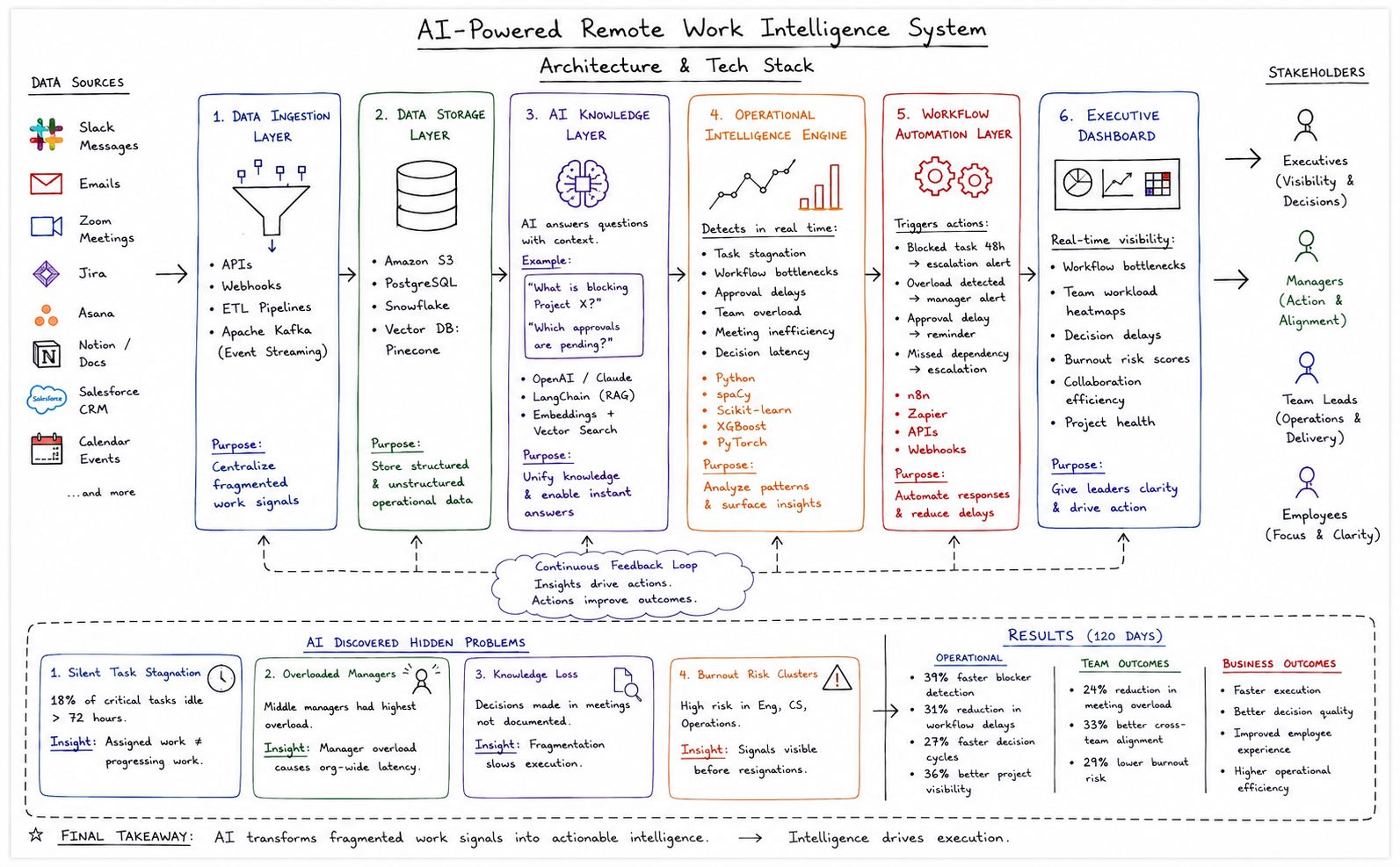
Build an AI-powered Remote Work Intelligence System.
The system needed to continuously answer:
– Where is work slowing down?
– What blockers exist?
– Which teams are overloaded?
– What needs leadership attention now?
AI became an intelligence layer above all collaboration systems.
AI Solution Architecture
The solution was built across six layers.
Layer 1: Data Ingestion Layer
AI collected signals from all work systems.
Data sources included:
– Slack messages
– Emails
– Meeting transcripts
– Task management tools
– CRM activity
– Calendar events
– Project documentation
Tech Stack
– APIs
– Webhooks
– ETL pipelines
– Event streaming via Apache Kafka
Purpose:
Centralize fragmented work signals.
Layer 2: Data Storage Layer
All operational data flowed into centralized storage.
Tech Stack
– Amazon S3
– PostgreSQL
– Snowflake
– Vector DB: Pinecone
Purpose:
Enable structured analytics and semantic retrieval.
Layer 3: AI Knowledge Layer
AI unified organizational knowledge.
Employees could ask:
– What is blocking Project X?
– Which approvals are pending?
– What decisions were made last week?
AI provided instant contextual answers.
Tech Stack
– OpenAI GPT Models
– Claude
– RAG pipelines via LangChain
– Embeddings + vector search
Layer 4: Operational Intelligence Engine
AI analyzed work patterns in real time.
It detected:
– Task stagnation
– Workflow bottlenecks
– Approval delays
– Team overload
– Meeting inefficiency
– Decision latency
Tech Stack
– Python
– spaCy
– Scikit-learn
– XGBoost
– PyTorch
Layer 5: Workflow Automation Layer
AI triggered real-time actions.
Examples:
– Task blocked 48 hours → escalation alert
– Team overload detected → manager notification
– Approval delay → automatic reminder
– Missed dependency → workflow escalation
Tech Stack
– n8n
– Zapier
– APIs
– Webhooks
Layer 6: Executive Dashboard
Leadership received AI-powered visibility.
Dashboard displayed:
– Workflow bottlenecks
– Team workload heatmaps
– Decision delay metrics
– Burnout risk scores
– Collaboration efficiency
– Project health
Leadership gained visibility they had lost in remote work.
What AI Discovered
Within 45 days, AI surfaced major hidden issues.
Hidden Problem #1: Silent Task Stagnation
18% of critical tasks were idle for more than 72 hours.
No one noticed because tasks appeared assigned.
Insight
Assigned work ≠ progressing work.
Hidden Problem #2: Overloaded Managers
Middle managers had the highest overload score.
Their calendars were packed with meetings.
This slowed approvals.
Insight
Manager overload created organization-wide latency.
Hidden Problem #3: Knowledge Loss in Meetings
Important decisions were made in meetings but rarely documented.
Teams repeatedly revisited resolved issues.
Insight
Knowledge fragmentation slowed execution.
Hidden Problem #4: Burnout Risk Clusters
AI detected burnout risk concentrated in:
– Engineering
– Customer Success
– Operations
Signals included:
– High after-hours activity
– Excessive meetings
– Rising response delays
Insight
Burnout signals were visible long before resignations.
Results After 120 Days
The AI implementation delivered measurable improvements.
Operational Results
– 39% faster blocker detection
– 31% reduction in workflow delays
– 27% faster decision cycles
– 36% better project visibility
Team Outcomes
– 24% reduction in meeting overload
– 33% better cross-team alignment
– 29% lower burnout risk
Business Outcomes
– Faster execution
– Better decision quality
– Improved employee experience
– Higher operational efficiency
The Bigger Lesson
Remote teams don’t fail because people stop working.
They fail when leaders lose visibility into how work actually flows.
That’s the real challenge.
The best remote organizations don’t just trust people more.
They build systems that make collaboration visible.
That’s where AI creates real leverage.
Not by replacing remote teams.
By giving leaders operational intelligence at scale.
Final Takeaway
Ask yourself:
– Where are hidden blockers slowing your remote team?
– Which bottlenecks remain invisible?
– Where is knowledge getting lost?
Remote work itself is not the problem.
Lack of visibility is.
AI changes that.
It transforms fragmented work signals into actionable intelligence.
And intelligence drives execution.